Most SaaS teams do this backwards. They see a competitor bidding on a keyword, assume it must be working, and add it to their own campaign.
The problem is that what works for a VC-backed competitor with a $400 LTV can destroy the unit economics of a bootstrapped product with a $90 LTV. Competitor data is useful. Copying competitor’s strategy without knowing their business model is guesswork.
A good competitive PPC analysis tells you two things: where you can win, and where you’ll bleed budget trying. Sometimes the most valuable output is a list of keywords to avoid, not keywords to add.
What is competitive PPC analysis for SaaS
Competitive paid search analysis is the process of reviewing what your SaaS competitors are bidding on, how they position their ads, and what landing pages they send traffic to.
For SaaS, the goal isn’t to mirror them. It’s to understand what’s working in the market, find the gaps they’ve left open, and use that intelligence to build something better. If multiple competitors emphasize the same value proposition and those ads are ranking at the top, that messaging matters to your audience. The right move isn’t to copy it. It’s to understand why it resonates, then write a version that beats it.
Your PPC competitors are not always your product competitors. A company bidding on “project management software” might be Asana, Monday, or a small niche tool. They all have different LTVs and different budgets. You need to know who you’re actually competing against in the auction, not just who you compete with in the market.
Two things to look for: gaps, keywords they’re not bidding on that you could win, and traps, keywords they bid on aggressively that signal low-LTV user intent you don’t want. And a third: keywords they bid on that you don’t, where intent is strong and the keyword could expand your existing campaigns.
What to analyze in a competitive paid search audit
There are four areas to review. Each one tells you something different about where you can win and where you’ll waste budget.
1. Competitor keyword strategy
Which terms are they bidding on? Separate head terms (high volume, expensive) from long-tail and adjacent terms. For PLG SaaS, the more interesting question isn’t what they’re bidding on. It’s what they stopped bidding on, and why.
Tools for this: Google Auction Insights (free, inside your own account), Google Transparency Center, SpyFu, Ahrefs, and SEMrush. More on each in the step-by-step section below.
2. Ad copy and positioning
What outcome do they promise? What ICP do they speak to? For SaaS, look for three things:
- Free trial vs demo vs freemium framing
- Feature-first vs outcome-first messaging
- Which pain points they name
This is where you find positioning gaps. If every competitor leads with “all-in-one platform,” there’s space to be specific.
Here’s how to use competitor ad copy intelligently. When you analyze ads across your competitive set, look for patterns. If three or four competitors emphasize the same value proposition, and those ads consistently appear at the top of results or are marked as top performers in SpyFu, that messaging is resonating with your audience. It’s important. You need to have it.
But not by copying it. Take the value proposition, understand why it works, then write a version that’s sharper, more specific, and better positioned than anything a competitor has written. Use their intel as your foundation. Build something they can’t match.
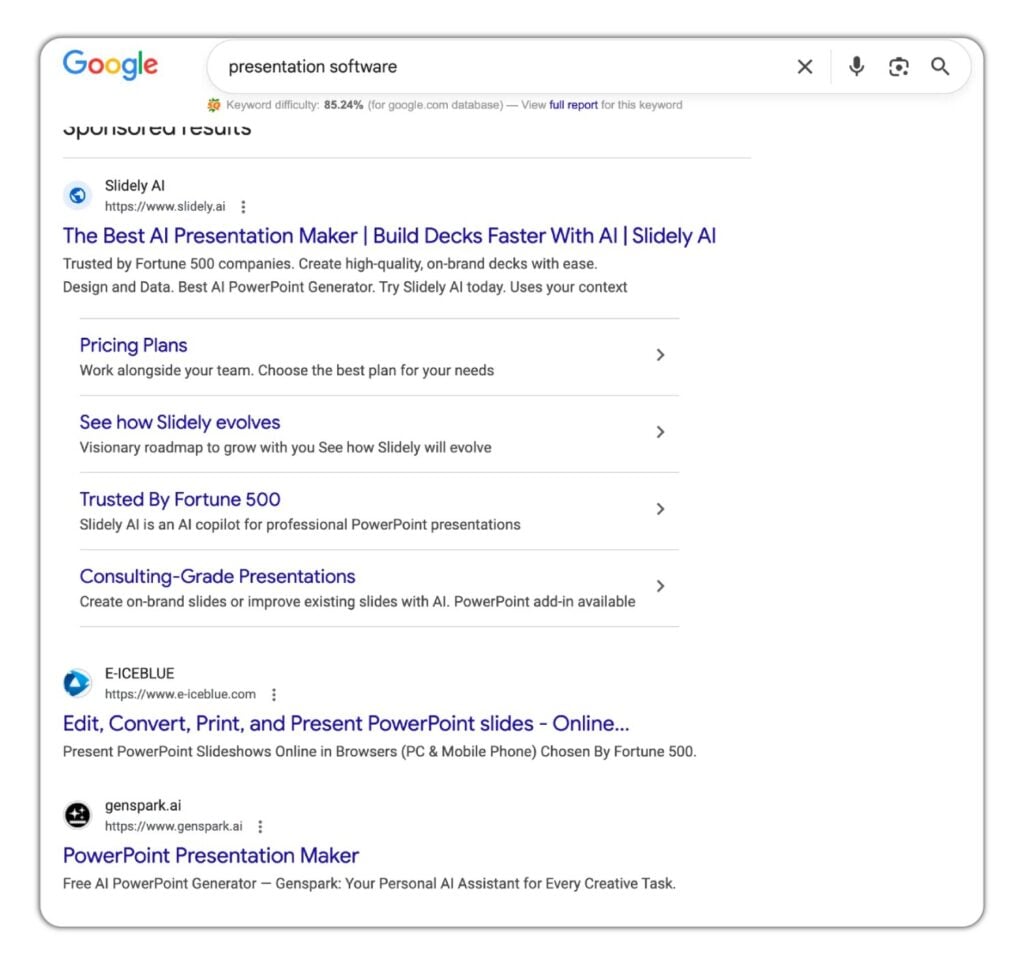
Example: “presentation software” search.
Here’s what this looks like in practice. You search “presentation software” in Google. You note who appears in the top paid positions. You click each ad and open the landing page. You fill in this table.
| Competitor | Headline angle | Outcome promised | ICP signal | Offer framing | CTA | What they avoid saying |
|---|---|---|---|---|---|---|
| Canva | “Create Beautiful Presentations” | Good-looking slides, fast | Everyone: students, teams, individuals | Free forever tier | Start for free | Nothing about business outcomes, no mention of team adoption or ROI |
| Beautiful.ai | “AI Designs Your Slides For You” | Time saved on design | Teams and business users | Free trial | Try free | No mention of what happens after the deck |
| Prezi | “Presentations That Move” | Audience engagement, non-linear storytelling | Presenters, sales, educators | Free plan available | Get started free | No mention of speed, no template volume, nothing about brand consistency |
| Gamma | “Make a Deck in 30 Seconds” | Speed of creation via AI prompt | Founders, marketers in a hurry | Free tier | Try Gamma free | No mention of team features, brand controls, or output quality |
Now look at what the analysis tells you. Every competitor positions itself as an AI presentation maker. That’s a signal the audience expects it. Most lead with speed or design quality. Templates come up across the board.
You now know what matters to buyers. Not from guessing. From the market. Now write ads that include those elements but beat every version already running. Higher CTRs, lower CPCs, better CAC.
You now know what’s important to users. Not from guessing. From the market. Now write ads that include those elements but beat every version that’s already out there. Higher CTRs, lower CPCs, better CAC.
TextByChoice is a good example of this working in practice. Camel Digital built a custom landing page for a specific ICP (political campaigns) and hit 140% ROAS in month one. That came from a positioning gap found in competitor analysis. Only a few competitors were speaking to that buyer.
3. Landing pages
Where do they send traffic? Homepage, generic feature page, or a dedicated landing page matched to the keyword?
For PLG SaaS, a competitor sending traffic to their homepage is a signal. Their CRO is weak. You can win on conversion rate even if their bid is higher.
Here is how Camel Digital uses competitor landing pages when building campaigns. We don’t look at them to copy. We look at them to understand what the market has already figured out, and then build something better.
Specifically, we look for:
- What layout do multiple competitors use? If three out of four follow the same structure, that structure is probably converting. Don’t ignore it.
- What do competitors put highest on the page? If the same value proposition appears above the fold across multiple competitors, your audience cares about it. It needs to be on your page too, but written and designed better.
- What are they missing? Every competitor landing page has gaps. Those gaps are your differentiation.
- How can you take what’s clearly working, make it better, and add what nobody else is saying?
The goal is never to copy. It’s to use the market’s collective testing as your starting point, then build a page that’s more specific, more relevant, and more converting than anything currently running.
4. Auction Insights data
This is the most underused free tool in Google Ads. It’s inside your own account under Campaigns > Auction Insights. Run it at campaign level, because the competitor mix changes by campaign type.
Four metrics and what they actually mean:
| Metric | What it tells you | What to do |
| Impression share | How often they show vs how often they could | Low = budget or bid constrained. High and rising = they increased spend. |
| Overlap rate | How often your ad and theirs show together | High overlap = you are fighting for the same audience |
| Position above rate | How often their ad shows above yours | High = they are bidding more aggressively or have a higher Quality Score |
| Outranking share | How often your ad shows above theirs | Low on a profitable campaign = test a bid increase |
This is your real competitive landscape. Not who you think you’re competing with. Who you’re actually competing with, in the auctions that matter to your business. Link your Auction Insights findings to your broader PPC for SaaS strategy to decide where to push and where to pull back.
What competitive PPC data tells you about unit economics
When you see a competitor bidding aggressively on a keyword, the more useful question isn’t what they’re doing. It’s what their bidding behavior tells you about the LTV of the user searching that term.
If a well-funded competitor holds the top position on a keyword at $15 CPC, they either have the LTV to support it or they’re burning capital. If your LTV for that user type is $40, you cannot win that keyword at that CPC. Don’t try. Move to a term where the buyer intent is stronger and your LTV can support the math.
If a competitor stopped bidding on a keyword in the last 90 days, that’s a signal worth reading. SpyFu’s bidding history shows this. They either found the LTV didn’t support the CPC, or they lost the auction and gave up. Both scenarios are worth testing at lower spend on your side.
Competitor ad copy tells you which user types they’re targeting. Students, freelancers, and enterprise buyers all have different LTVs. If a competitor’s ad says “free for students,” that’s a user segment you can intentionally exclude. Their targeting decision just told you something about the audience that term attracts.
Keep this filter in place throughout every competitive analysis: before acting on what a competitor is doing, run the math on whether your LTV can support it.

How to run a competitive paid search analysis for SaaS: step by step
Most competitive analysis stops at pulling a keyword list. This is the part where you actually use it.
Step 1: List your actual PPC competitors, not your product competitors
Run your 5-10 core keywords in Google. Note who’s in the top 3 paid positions consistently. Cross-check with Auction Insights inside your own account. That list is your real competitive set. It will surprise you.
Step 2: Find their ads in Google Ads Transparency Center
Start here. This is the most reliable source because it belongs to Google and shows real, live ads.
- Go to ads.google.com/transparency
- Enter your competitor’s URL or brand name
- Select a region (for example, United States)
- You will see all their active ads. The ones appearing most prominently have the most impact
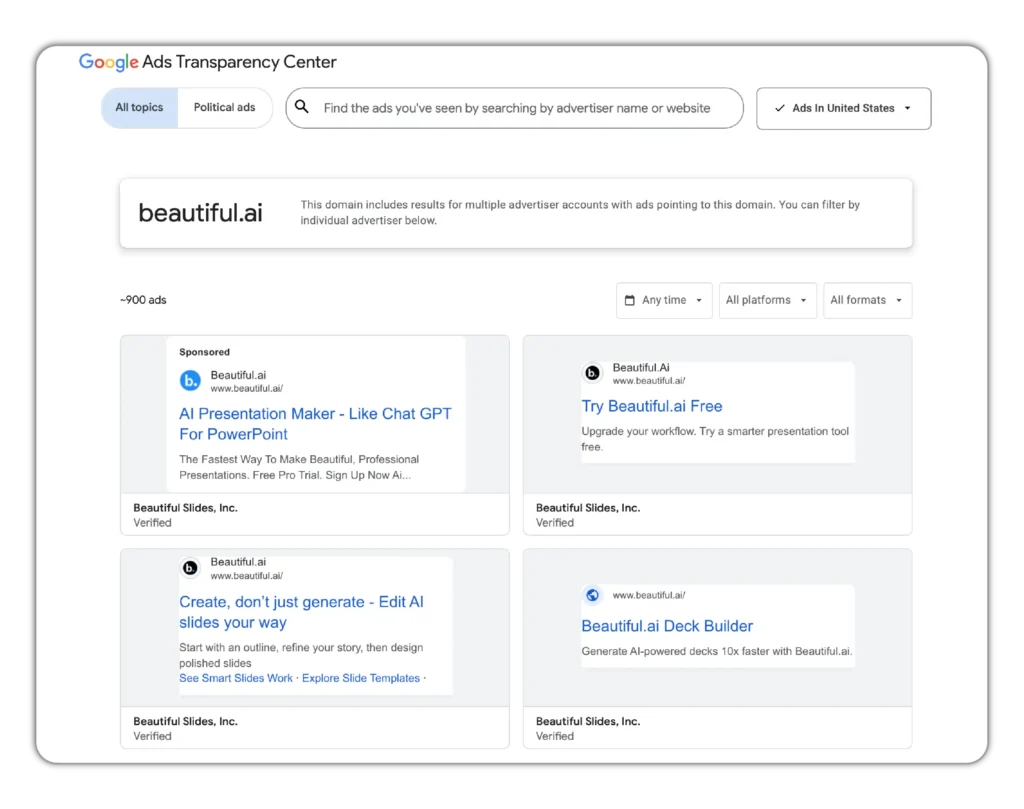
This gives you their current messaging, their CTA framing, and their offer positioning. Before using any other tool, start here.
Step 3: Pull their keyword strategy
Three tools give you the clearest picture of competitor keyword strategy: SpyFu, Ahrefs, and SEMrush. Use whichever you have access to. They largely cover the same ground, just with slightly different interfaces and data sets.
In SpyFu:
- Enter your competitor’s URL
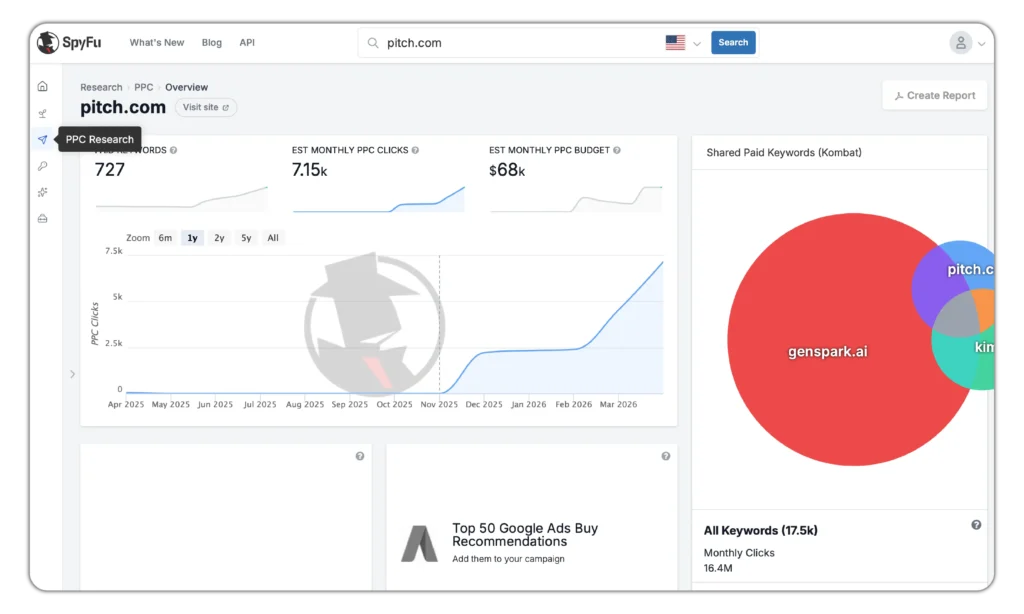
- Click on PPC Research
- Scroll down to “Most Successful Paid Keywords”
- Filter by search volume and paid clicks percentage
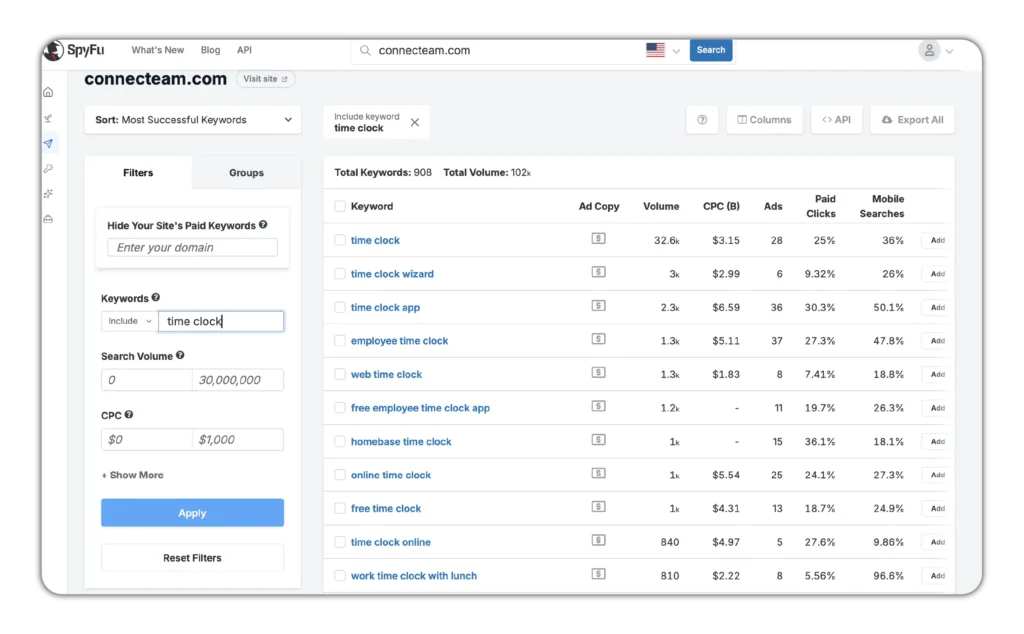
Look for: keywords they’ve been bidding on for 6+ months (working), keywords they recently dropped (didn’t work or didn’t convert), keywords where they hold top position at high CPC (high-LTV user intent, but expensive to enter).
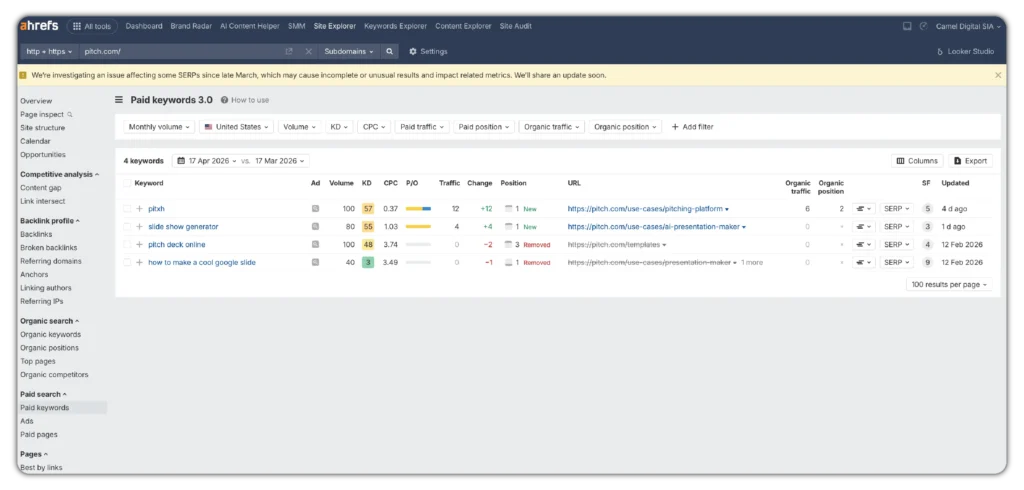
In Ahrefs:
- Click on Site Explorer, enter your competitor’s domain
- On the left menu under “Paid search,” click “Paid keywords”
- You’ll see all their paid keywords together with the landing pages they’re sending traffic to
In SEMrush:
- Go to Advertising Research (under the Competitive Research menu)
- Enter your competitor’s domain and click Search
- The tool generates a full PPC report. Scroll down to “Paid Search Positions” to see the exact keywords they’re bidding on, average CPC for each, and the landing page URL
- Filter by search volume, CPC, and competitive density to narrow to the keywords most relevant to your campaigns
- Export the list to CSV for further analysis
Step 4: Review ad copy for positioning gaps
For each competitor, note: what outcome they promise, what ICP they name, what CTA they use. Use the table format from the presentation software example above. Look for what no one is saying. That’s your angle.
Once you see what multiple competitors emphasize, you know what the market considers important. Now write something that covers those foundations but beats every version already running. That’s how you earn higher CTRs, improve Quality Scores, and pay less per click.
Step 5: Check their landing pages
Click the ads. Does the LP match the keyword? Is it a homepage or a dedicated page? Does it have a clear trial CTA above the fold?
How to find competitor landing pages:
- Google your high-intent target keywords and open the pages that appear in paid positions
- In SpyFu: enter competitor name, go to PPC keywords, hover over the dollar sign in the ad copy column, click the small arrow icon to open their landing page directly
- In Ahrefs: the paid keywords report shows the landing page URL alongside each keyword
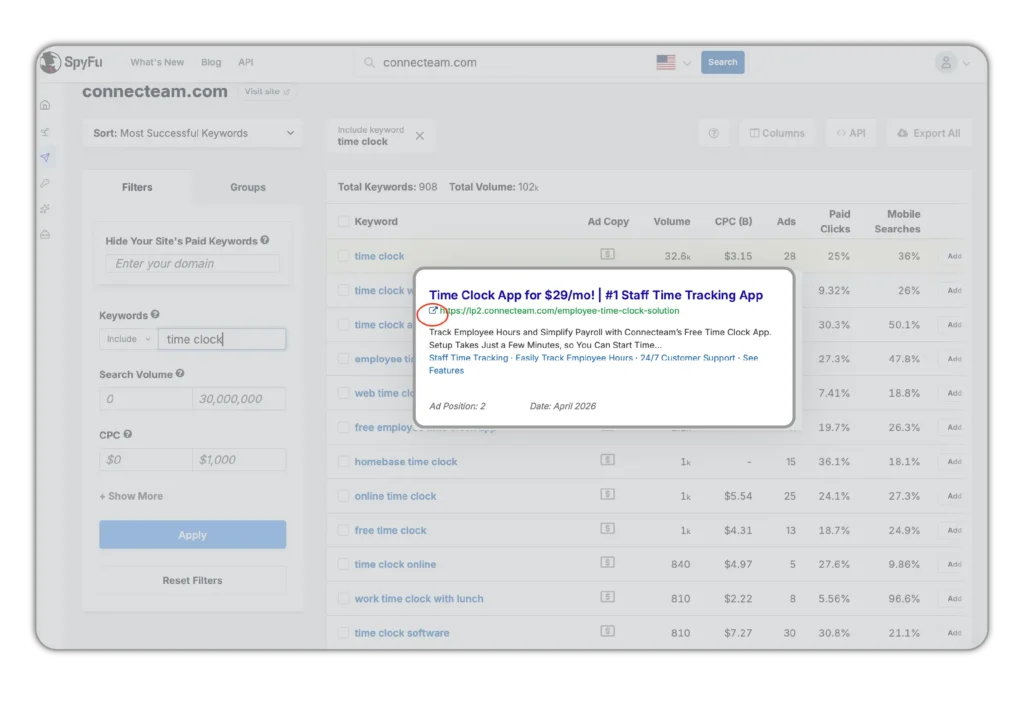
When reviewing competitor landing pages, look at:
- What layout do multiple competitors use? Similar structures across the competitive set usually mean that structure converts.
- What do they put highest on the page? If the same element appears above the fold across three or four competitors, your audience expects it.
- What are they missing? Every gap is a differentiation opportunity.
- How can you take what’s working, make it better, and add what nobody else is saying?
The Google Ads for SaaS guide covers how landing page structure connects to campaign performance and Quality Score.
Step 6: Map findings to your own unit economics
Before adding any keyword based on competitor data, run the math. At their CPC, can your LTV support a CPA that pays back in under 10 months? If not, skip it. Regardless of what they’re doing.
Step 7: Repeat quarterly
Competitor strategies shift. A new funding round can change someone’s bidding behavior overnight. Set a quarterly cadence for a full review. A weekly Auction Insights check takes 10 minutes and catches most changes before they affect your campaigns.
What competitive analysis won’t tell you
Competitor data has a ceiling. You should know where it stops.
- You can’t see their conversion rates. A competitor holding top position at $20 CPC with a 1% landing page CVR is losing money. You don’t know that from keyword data.
- You can’t see their actual ROAS. Estimated spend numbers from tools are rough. Don’t set your budget based on someone else’s estimated spend.
- Ad copy that’s been running for months isn’t always proof it works. Some companies just don’t turn things off.
- You can’t see their LTV. The most important variable in whether their strategy is sustainable is invisible to you.
Use competitor data to find where to start testing. Not to justify a strategy.
Run a competitive analysis that actually moves your CPA
A competitive paid search analysis is most useful when it’s filtered through your own unit economics. Knowing what competitors bid on is step one. Knowing whether you can profitably win those keywords is the work.
Camel Digital offers a free audit for PLG SaaS teams who want a read on their competitive landscape and whether their current keyword strategy holds up. You share your screen, we share what we see. No pitch, no follow-up pressure. You walk away knowing exactly where you stand.

FAQs
What is competitive paid search analysis for SaaS?
Competitive paid search analysis is the process of reviewing what your SaaS competitors bid on, how they position their ads, and where they send traffic. For SaaS, the goal is to find where you can win and where you’ll lose budget trying. It also tells you which user types competitors are targeting, which matters for LTV decisions.
Why is competitor analysis important for PPC?
Because your competitors have already spent money testing what works in your market. A good PPC competitive analysis lets you use that as a starting point. You find which messages resonate with your audience, which keywords attract high-LTV buyers, and where gaps exist that nobody is filling. It shortens your testing cycle and lowers your CAC.
What should be included in a competitive paid search analysis?
Four areas: keyword strategy (what they bid on and what they’ve dropped), ad copy and positioning (what outcomes they promise and which ICPs they speak to), landing pages (where they send traffic and how well it converts), and Auction Insights data (who you’re actually competing with in real auctions). For SaaS, every finding should be filtered through your own unit economics before acting on it.
How often should you run a PPC competitive analysis?
A full competitive PPC analysis should run quarterly. Competitor strategies shift with funding rounds, product changes, and seasonal budget moves. A lighter check, reviewing Auction Insights and running a few keywords through Google Transparency Center, is worth doing monthly.
What free tools can I use for competitive PPC analysis?
Google Ads Auction Insights is the most underused free tool available. It shows exactly who you’re competing against in real auctions. Google Ads Transparency Center is also free and shows live competitor ads by domain. Both give you real data, not estimates.
Can competitor PPC data help me decide which keywords to avoid?
Yes, and this is one of the most valuable uses of the analysis. If a well-funded competitor bids aggressively on a keyword that signals low-LTV user intent, that’s a trap, not an opportunity. Competitive data helps you see which keywords attract the wrong user type before you spend money finding out yourself.
What does impression share tell you about your PPC competitors?
Impression share in Auction Insights shows how often a competitor’s ad appears relative to how often it could. A competitor with rising impression share has increased budget or bids. A competitor with low impression share is constrained. This tells you where to push and where the competition is thinning out.
How do I know if a competitor’s keyword strategy is actually working?
You can’t know for certain. You can’t see their conversion rates, ROAS, or LTV. What you can see is longevity. Keywords a competitor has bid on consistently for six or more months are more likely to be profitable than ones they recently dropped. SpyFu’s bidding history is the clearest signal available for this.