After managing over $10M in ad spend for PLG SaaS companies, here is the honest answer: Google Ads for SaaS works for some products. And it fails badly for others.
The difference is rarely the ads themselves.
This article will help you figure out which side you’re on. You’ll know whether your unit economics support Google Ads, what to advertise first, how to set it up correctly, and what mistakes kill most SaaS campaigns before they get a fair shot.
By the end, you’ll have a clear decision, not a to-do list.
Should you run Google Ads for your SaaS?
Google Ads works for SaaS when three conditions are in place: the unit economics support the CPC environment, the product has real demand that people search for, and you’re advertising the right use cases.
Remove any one of those, and you get expensive traffic that doesn’t become revenue.
Most SaaS Google Ads accounts underperform because companies skip the readiness check. They launch campaigns before the basics are in place, and then conclude that Google Ads doesn’t work for SaaS.
It does. Just not for every product, at every stage, with every budget.
Is your SaaS ready for Google Ads? A readiness checklist
Before running any spend, check these six criteria. If more than one or two are missing, fix them first. Spending money on a broken foundation doesn’t produce results, it just burns the budget faster.
Unit economics: the minimum viable math
This is the first thing to check. Before you write a single ad, run the numbers.
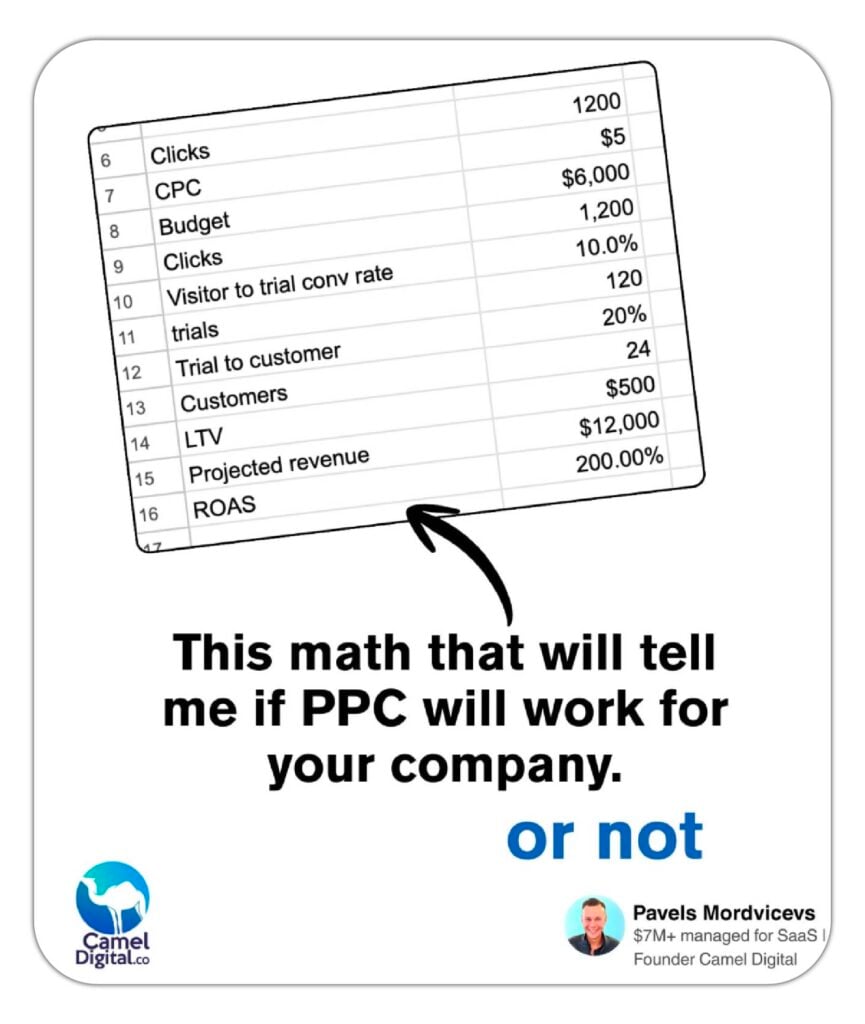
Here’s how to do it in under 30 minutes.
Step 1: Find your average CPC.
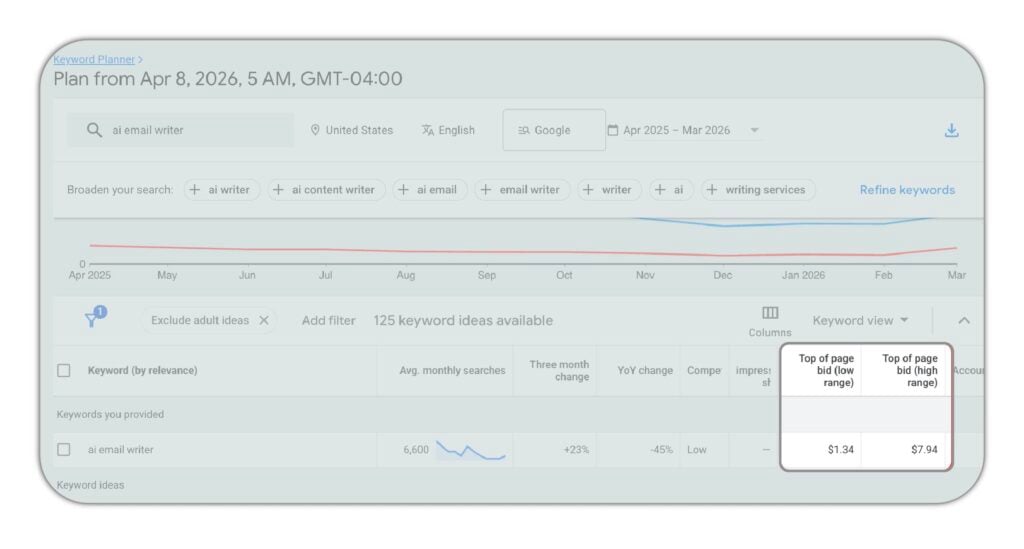
Open Google Ads. Go to Tools > Planning > Keyword Planner. Enter your core keyword, for example, “ai email writer.” Look at the “Top of page bid” range. The low end might be $1.34. The high end might be $7.94.
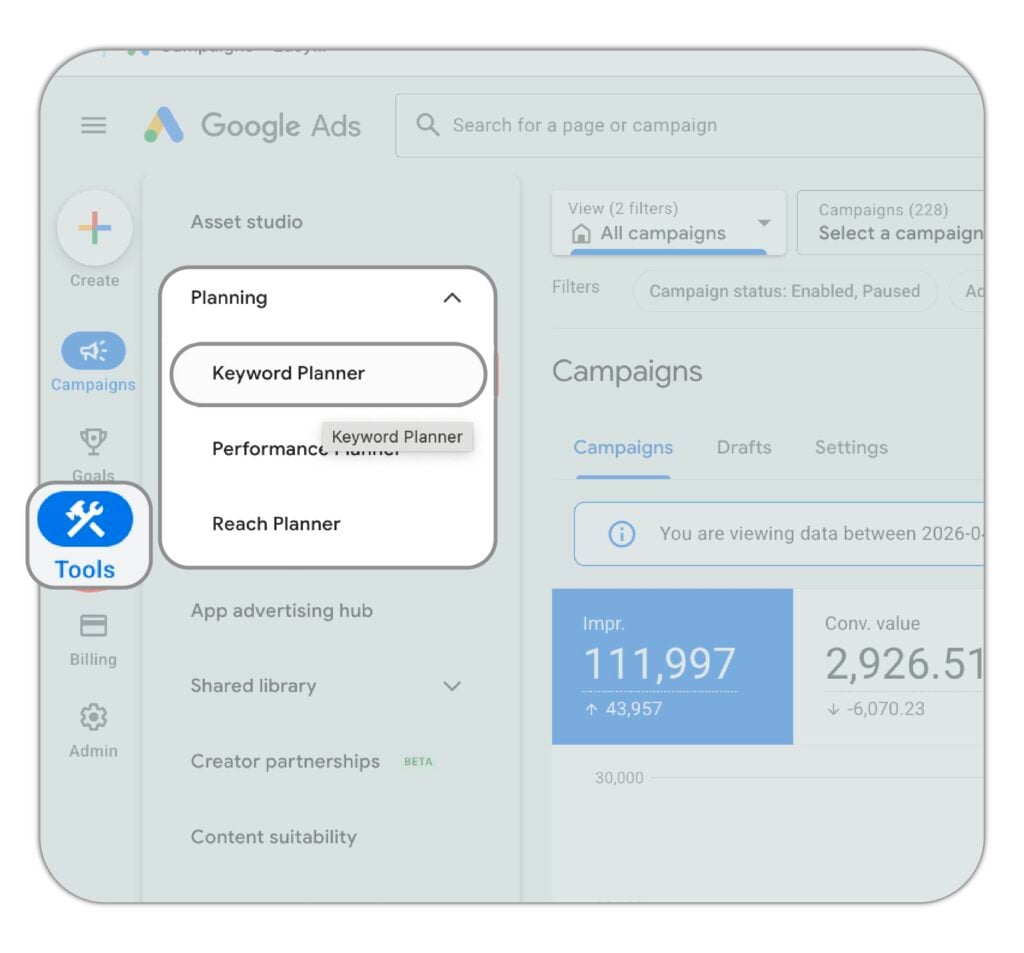
Don’t use the low end. Assume competition and take a number in the upper half of the range. In this example, use $5.
Step 2: Build a simple spreadsheet.
Put in four numbers:
- Average CPC (from Keyword Planner)
- Visitor-to-trial conversion rate (from your product page analytics, not your blog)
- Trial-to-paid rate (what percentage of trials become paying customers)
- Average LTV (lifetime value of a paying customer)
Run the math. What’s your cost per trial? What’s your cost per paid customer?
Step 3: Check against two targets.
Your CPA should sit under 50% of LTV. Payback should come in under 10 months, ideally 6 or fewer. For higher-ticket products with long-term business customers, 12 months is acceptable.
If the numbers work in your spreadsheet, Google Ads is worth testing. It’s easier to improve a campaign that starts with working economics than to fix one where the math never made sense.
If the numbers don’t work, don’t launch. No amount of campaign optimization closes a 3x gap between CPA and LTV.
Search demand: is your problem actually being searched for?
Google Ads captures existing demand. It does not create it.
If your target buyer isn’t typing a relevant query into Google, there is no inventory to buy. Check the search volume for your core terms in Keyword Planner before committing any budget.
A few hundred searches per month for your best keywords isn’t just a launch problem, it’s a scaling problem. Some SaaS products solve real problems that people don’t search for by name. If that’s you, paid search isn’t the right channel yet.
Tracking: non-negotiable
You cannot run a profitable Google Ads account without knowing what happens after the click.
For PLG SaaS, these are the events you must track, separately, not lumped together:
- Signup or trial start
- Credit card added
- Quality signals: team member added, project created, file downloaded, work item added (anything that signals the user is actually using the product)
- Plan purchased
Optimising to form submissions or GA4 pageviews teaches the algorithm to find users who complete those events. Not users who pay.
Most SaaS accounts optimize only for trial starts. That means they’re training Google to find people who sign up and disappear. Track the full funnel. The product database is your source of truth, not GA4.
Product-market fit: Google supports it, it does not create it
If your organic and direct traffic isn’t converting, paid traffic will convert at the same rate or worse, at a much higher cost.
Before launching Google Ads, check that these are solid:
- Onboarding works and people are using the product after signup
- You know your ICP and their pain points
- Your messaging matches what buyers are actually searching for
- Activation is in place (users know what to do after they sign up)
You can run excellent campaigns with well-crafted landing pages. But if users sign up and don’t activate, you’re just paying more for the same problem organic traffic already revealed for free.
Conversion-focused landing pages to match the intent
Ad traffic sent to your homepage loses 60-80% of its conversion potential.
Each campaign needs a dedicated page matched to the keyword and the audience. Someone searching “time tracking software for construction” should land on a page about time tracking for construction, not your generic product homepage.
The page needs one clear conversion action, outcome-led copy (what the user gets, not what your product does), and specific proof.
Budget: meaningful or not at all
Under $5,000 per month in ad spend produces so few clicks that optimization is effectively impossible.
Here’s why. In high-LTV markets, think HR tech, legal SaaS, enterprise tools. CPCs can reach $30 per click or more. At $60 per day, you get two clicks. Google’s smart bidding needs data to learn. Two clicks per day gives it nothing to work with.
If your CPCs are lower and you can generate 20-30 clicks per day on a smaller budget, that’s workable. But if the math puts you at 2-5 clicks per day, you don’t have a campaign, you have an expensive experiment with no sample size.
What to advertise first, and what to skip
This is one of the places where most SaaS Google Ads campaigns go wrong. Agencies and in-house teams advertise everything. They pick keywords based on volume, not unit economics.
Choosing what to advertise is not a keyword decision. It’s a business decision.
What products and features to advertise
Before choosing keywords, identify which use cases in your product produce the highest LTV and the fastest activation. Advertise those first.
One example from our client: early campaigns ran across multiple product use cases. Presentation maker versus chart maker. On the surface, both seemed like reasonable targets.
But the LTV data told a different story. The presentation software attracted business users with an LTV of $250 or more. The chart maker attracted students who paid once and cancelled. LTV of $40 or less.
Same product family. Very different economics.
Once we stopped advertising chart makers and focused our budget on presentation makers and presentation tools, the results changed. That single targeting decision, not a campaign structure change, not a bidding adjustment, was what moved the numbers.
Do this analysis before you write a single keyword. Map each use case to LTV and activation rate. Advertise the ones that can support your CPA target.
What not to advertise
Some things are worth skipping entirely, at least early on:
- Features with low activation rates or high churn
- Use cases outside your core ICP
- Category terms dominated by enterprise players with 10x your budget
- Informational queries like “what is project management”, no buying intent, high volume, low conversion
- Mobile traffic if your product is desktop-native
On that last point: for PLG SaaS products, mobile traffic routinely underperforms. How many people who sign up from a phone will open a presentation tool or a time tracking app on mobile and use it properly? The activation rate is low. You’re paying high CPCs to acquire users who won’t stay.
Check your GA4 cross-device data. The drop-off from mobile signup to desktop usage is almost always worse than it looks.
How to structure Google Ads for SaaS
Start with Google Search. This is where buyers are actively looking for something you offer. Your job is to put the right ad in front of the right query and send them to a page that answers it.
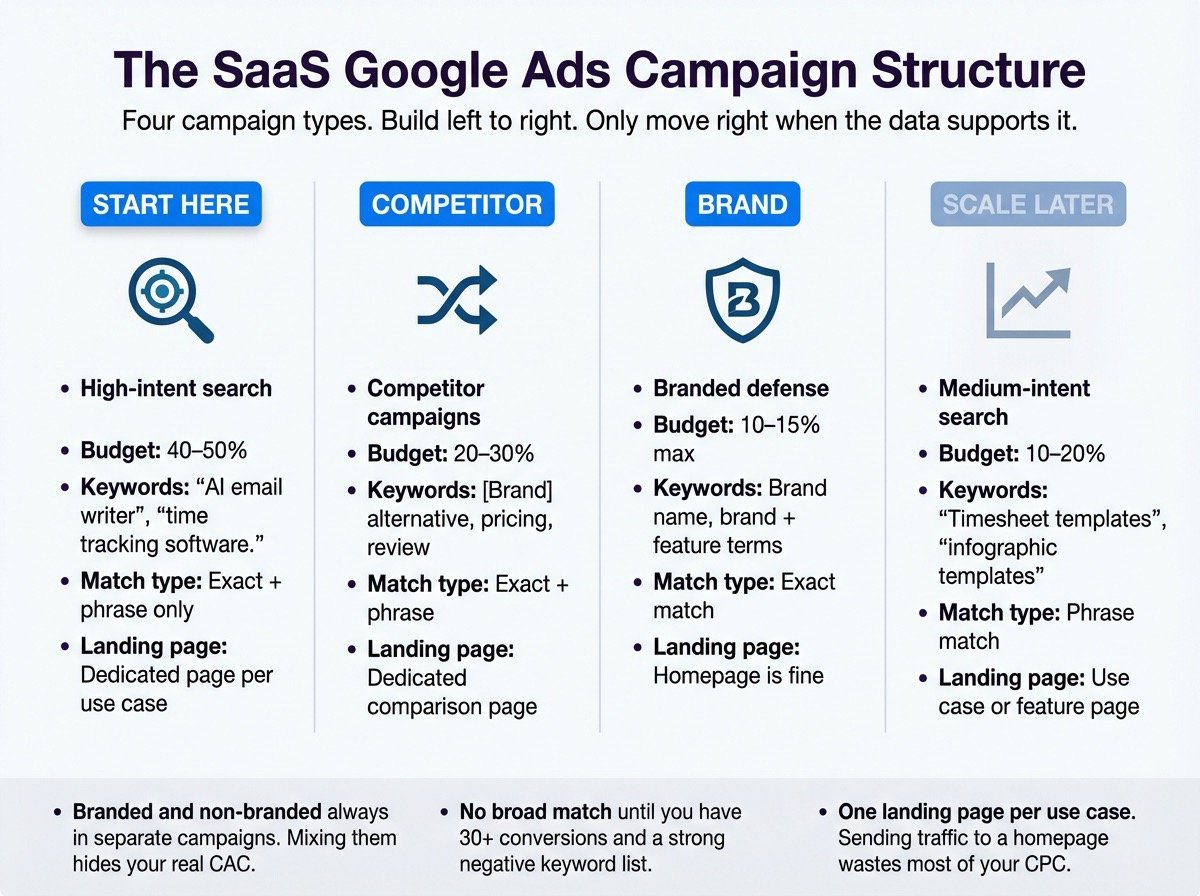
High-intent keywords, people who know a solution exists and are looking for it. “AI email writer,” “time tracking software,” “digital signage platform.” These are your best-converting keywords. Start here.
Industry-specific high-intent keywords, the same intent, narrowed by vertical. “Time tracking software for construction,” “CRM for real estate investors,” “digital signage for healthcare.” CPCs are just as high, sometimes higher. But because the intent is tighter and the ad and page can speak directly to a specific buyer, conversion rates are stronger. The math often works out better than generic equivalents.
Medium-intent keywords, users who have a problem and are researching solutions but haven’t named one yet. “Timesheet templates,” “infographic templates.” CPCs are often lower. Conversion rates are also lower. Test these after your high-intent campaigns are profitable.
Competitor keywords, “[Competitor] alternative,” “[Competitor] vs,” “[Competitor] pricing,” “[Competitor] review.” Users searching these are already unhappy or evaluating. They have buying intent and an open mind. This needs a dedicated comparison landing page to convert.
Branded search, protect your brand. No more than 10-15% of total budget. Keeps competitors off your brand terms and gives Google’s smart bidding faster conversion data to learn from.
Right campaign structure
Structure is how you protect relevance. Google rewards relevance, it’s why people trust the platform.
Here’s the rule: similar keywords that lead to the same landing page go in one ad group. Different use cases with different landing pages go in different ad groups.
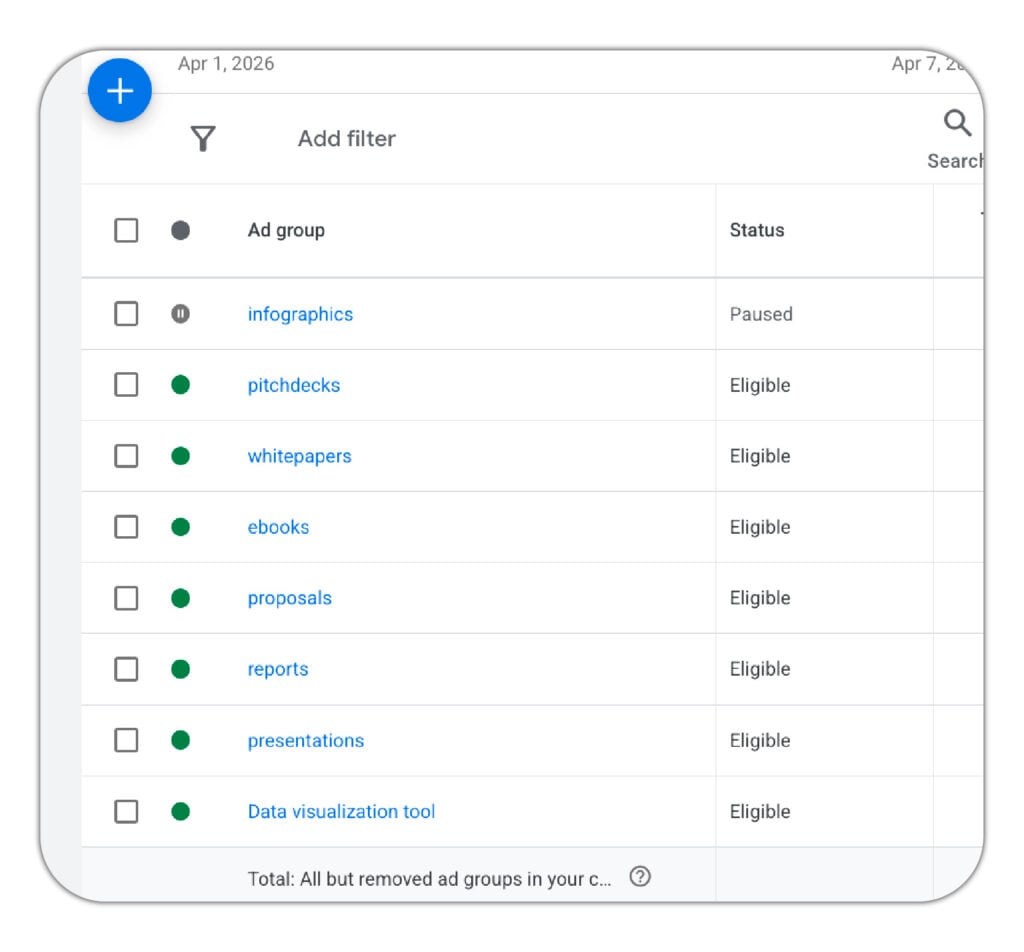
Why it matters: if you put “presentation maker” and “infographic maker” in the same ad group, someone searching for presentation tools might see an infographic ad and land on an infographic page. Intent mismatch. Low relevance. High bounce rate. Low conversion.
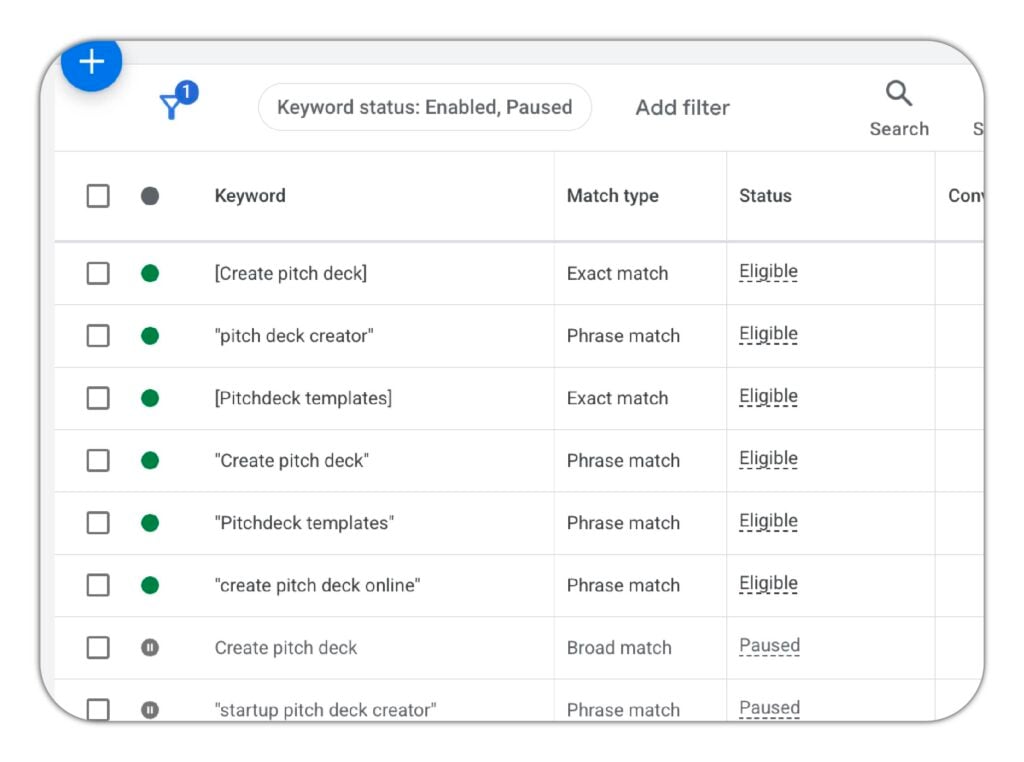
Keep each ad group to 10-15 keywords at most. Use exact and phrase match. Avoid broad match unless your account has a lot of conversion data and a strong negative keyword list, broad match will generate irrelevant search queries that eat budget without converting.
Branded vs non-branded: why they must be separated
This is the most common structural mistake in SaaS Google Ads accounts.
Branded campaigns capture users who already know your product. Non-branded campaigns find new buyers. These measure entirely different things.
When you mix them, your ROAS looks healthy because branded conversions, people who were already going to buy, inflate the numbers. The true cost of acquiring a new customer is hidden.
Keep them in separate campaigns. Report them separately. The metric that matters for growth is non-branded CPA.
Uploading customers and trials for faster learning
When you launch a new account, Google has no data on your ideal customer. It learns from scratch. In the early weeks, you’ll often see higher CPCs and lower-quality traffic. The algorithm is finding its feet.
You can speed this up by uploading customer data.
Go to Tools > Shared Library > Audience Manager.
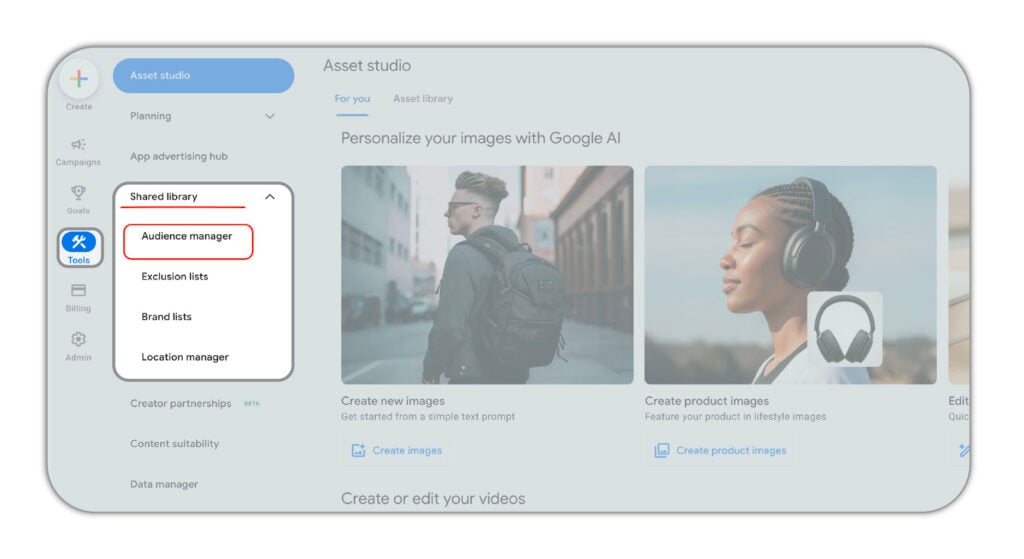
Click the plus button and create a Customer List.
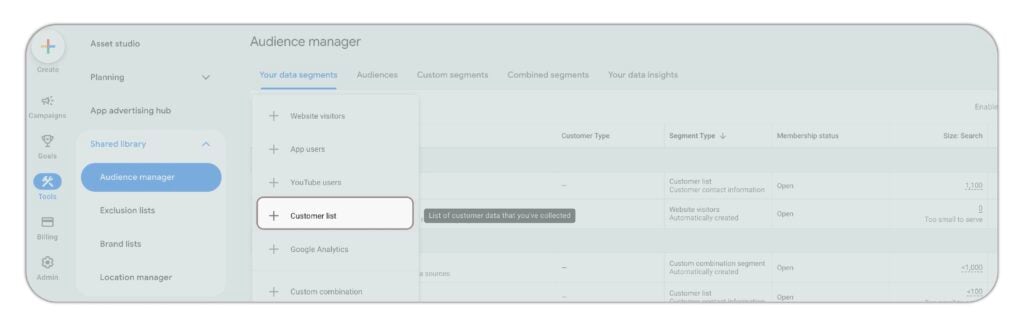
Upload:
- A list of paying customers (the bigger and older, the better)
- A list of high-quality trials that match your ICP
- An exclusion list of existing customers and their employees (so you stop spending on people who already signed up)
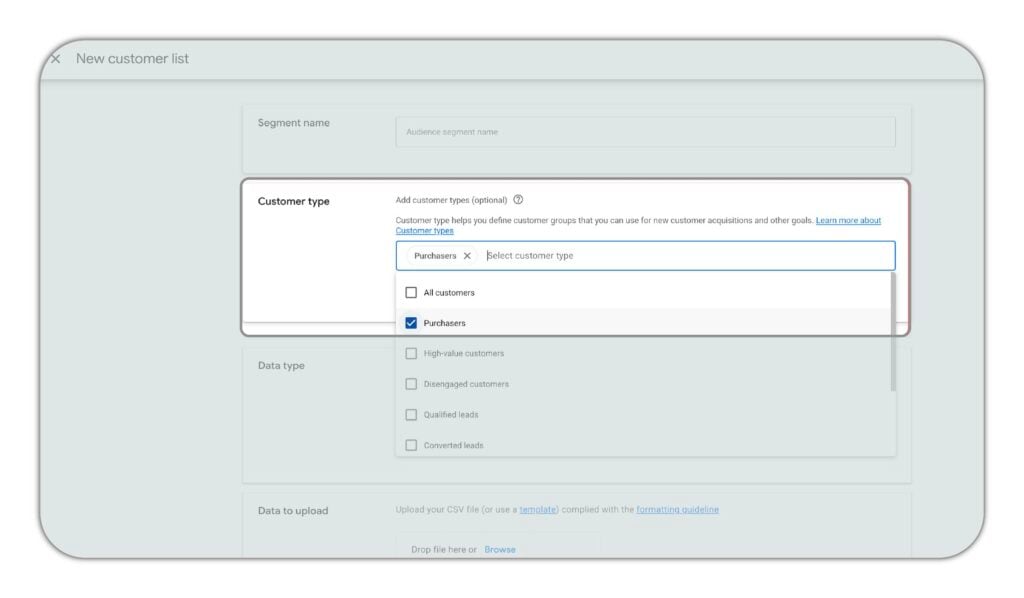
When you tell Google who your customers are, it adjusts its targeting faster. You’ll reach higher-quality users sooner and spend less getting there.
Campaign naming and budget control
Use a consistent naming convention from day one. A good format:
CD_GS_USA_TimeTracking_HighIntent
Breaking it down: channel (GS = Google Search), geography, keyword theme, intent level.
Readable campaign names make it possible to spot issues quickly, report clearly, and avoid misreading account performance. Messy naming leads to bad decisions.
Bid strategy: start it the right way
Start with Max Conversions. Move to target CPA only after accumulating 15-30 conversions in the last 30 days.
The algorithm needs data before constraints help it. Setting a tCPA target too early on thin data restricts volume without improving quality. You end up with fewer conversions and no signal on whether the targeting is working.
Let it learn first. Then constrain it.
What to track
What you track is what Google optimizes for. Get this wrong and the whole account learns the wrong lesson.
The conversion events that give strong quality signals
In order of revenue importance:
- plan purchased;
- credit card added;
- trial started.
All three should be tracked separately. Most SaaS accounts track only the trial start, which means they’re optimizing for the top of the funnel and ignoring where revenue actually comes from.
Track quality signals too:
- User added a team member.
- User created a project.
- User connected their account.
These events tell Google who is actually using the product, not just who clicked a button on a signup page.
When you have 15-30 quality-signal events in the last 30 days, you can shift your campaign optimization toward those events instead of raw trial volume. That’s when your ad targeting starts finding buyers instead of browsers.
Where possible, use offline conversion imports from your product database. The database is the source of truth.
Payback period as the north star
Monthly revenue from a paid customer divided by CAC equals payback in months.
This is the metric that tells you whether the channel is working. Not ROAS. Not CTR. Not cost-per-click.
Target: payback under 10 months. Ideal: 6 or fewer.
The metrics that mislead
- CTR tells you whether your ad is interesting, not whether it produces revenue.
- ROAS from branded campaigns is almost always inflated by existing demand, people who were already going to sign up. It looks great in a report and tells you almost nothing about acquisition efficiency.
- Impression share often just tells you your budget is too low. It’s not a reach metric worth optimizing toward.
- Lead volume without a quality filter is the most common vanity metric in SaaS PPC. More trials from the wrong users is a cost problem, not a growth signal.
When to scale, when to fix, and when to stop
Here’s a simple framework for reading the signals:
| Signal | Action | What it means |
| CPA consistently under 50% of LTV, trial-to-paid holding, real volume | Scale | The economics work. Add budget. |
| CPA rising, CVR declining, search terms drifting | Fix | Structural issue. Don’t add budget yet. |
| CPA above LTV, search volume too thin, tracking broken | Stop or pause | Google Ads is not the right channel right now. |
This is not a permanent verdict in either direction. SaaS companies that are a poor fit today, no product-market fit, broken tracking, thin search volume, can be a strong fit in 6 months. The goal is to be honest about where you are, not to spend through conditions that don’t support it.
When you do scale, do it in 20% weekly budget increases. Larger jumps push campaigns back into a learning phase and often break a CPA that was working.

Everything you need to know about SaaS Google Ads
Google Ads works on a simple principle, but google ads for B2B SaaS has an added layer of complexity: the journey from click to revenue is longer than most ad platforms account for.
For SaaS, the challenge is that the journey from click to revenue is longer than most ad platforms account for. Someone clicks an ad for “time tracking software,” starts a free trial, goes through onboarding, adds their team, and upgrades to a paid plan, that might take 14-30 days.
Most attribution tools will credit the ad for the trial start. The more important question is whether that trial became a paying customer. And whether the revenue from that customer pays back the cost of the click within a timeframe that works for your business.
This is why tracking matters so much. And why trial-to-paid rate is the number you need to watch, not impressions, not clicks, not even signups in isolation.
For PLG SaaS specifically, the conversion happens in the product, not in a sales call. That makes it faster to measure and easier to optimize, but also easier to get wrong. If you optimize for signups without checking who’s actually activating and paying, you can scale a campaign that looks efficient while your trial-to-paid rate quietly falls.
Why Google Ads underperforms for most SaaS companies
Most SaaS Google Ads accounts don’t fail because the channel doesn’t work. They fail for one of these reasons.
Advertising the wrong use cases
When you pick keywords based on search volume without checking LTV, you end up advertising use cases that attract the wrong buyers. Low-LTV users who churn. Students on a free plan. People who try once and leave.
The economics never work because the targeting was wrong from the start.
Poor campaign structure and low relevance
When all your products are in one ad group, every search gets the same ad and the same landing page. Someone searching for an AI email writer lands on a page about AI meeting assistants. The ad doesn’t match the search. The page doesn’t match the ad. You’re paying for a click that was never going to convert.
Google rewards relevance. Irrelevant campaigns get lower Quality Scores, higher CPCs, and worse placements. Structure is not optional.
Irrelevant or low-intent traffic
Broad match, AI Max without guardrails, and Performance Max on thin data all tend to generate search queries that look related but aren’t. A CRM platform starts appearing for “how to manage spreadsheets.” A video tool starts showing up for competitor terms it can’t win.
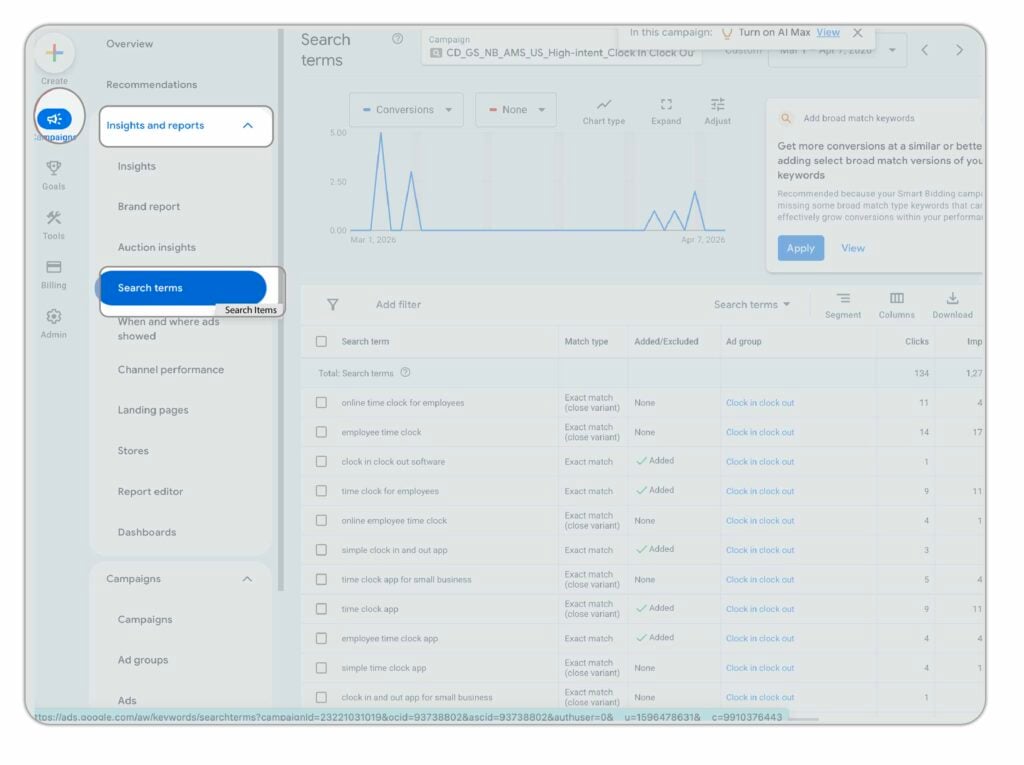
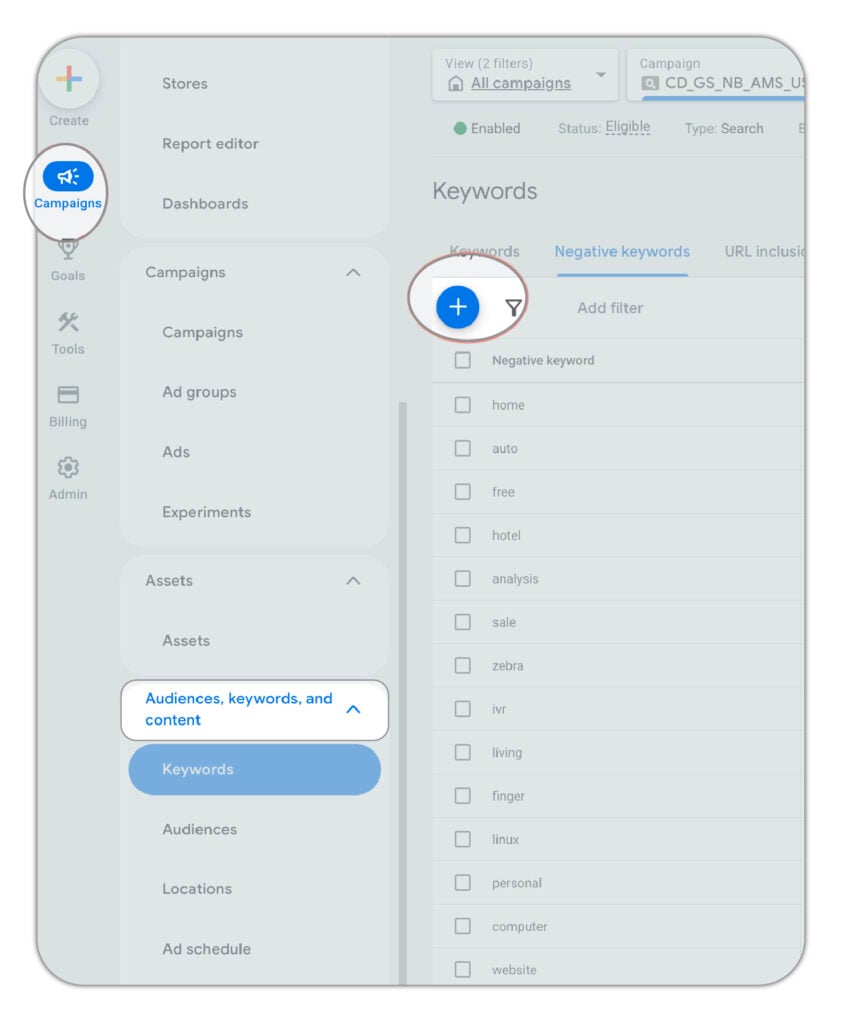
Check your search terms report regularly. Go to Campaigns > Insights and reports > Search terms. Everything irrelevant should be added to your negative keyword list. If you don’t do this weekly, especially in the first 60 days, you are funding traffic that will never convert.
Too much mobile traffic for a desktop product
If your product lives on a desktop and requires a proper onboarding session to get value, mobile signups will not activate at the same rate.
Check your GA4 cross-device data. For most PLG SaaS products, mobile signups rarely go on to use the product from a desktop. Mobile CPCs are often 50% lower, but if those users don’t activate or pay, you’re spending on volume that doesn’t convert to revenue.
For high-intent search campaigns, exclude or heavily reduce mobile bid modifiers unless your data says otherwise.
Weak or mismatched landing pages
Sending ad traffic to your homepage is one of the most common and expensive mistakes in SaaS PPC.
The landing page needs to match the keyword intent, speak to the specific use case, and have one clear conversion action. Without that, the campaign structure and bid strategy don’t matter. You’re paying for traffic that bounces.
Scaling before the economics are proven
The pattern is consistent: month 2 looks promising. Budget doubles. CAC breaks. The campaign that was just starting to find efficiency gets overwhelmed with new data and enters another learning phase.
The fix: hold your CPA target for 30-45 days before increasing spend materially. Scale in 20% weekly increments. Give the algorithm time to stay efficient as you grow.
Treating month 1 as a verdict
Month 1 is learning. The algorithm is finding patterns. The search terms report is noisy. Conversion data is thin.
Shutting down a campaign after 30 days because it didn’t produce revenue is one of the most common reasons profitable channels get abandoned. Month 1 is learning. Month 2 is tuning. Month 3 is when real signal emerges. Meaningful optimization compounds through month 6.
Tracking the wrong conversion events
Optimizing to form submissions, GA4 goals, or unverified pageview events teaches the algorithm to find users who complete those events. Not users who pay.
Fix tracking before launch. It is not optional. Every week you run campaigns on broken tracking is a week where the algorithm is learning the wrong lesson.

Understanding the types of Google Ads for SaaS
Not every campaign format is right for every stage. Here’s how to think about each one.
Google Search campaigns: capturing demand that already exists
Search is where you start. It’s where most of your budget should stay until the economics are proven.
The reason is simple: search intent. The user has a problem and is actively looking for a solution right now. That moment is worth paying for, when the keyword matches a use case your product solves and your LTV supports the CPC.
For PLG SaaS, search campaigns with exact and phrase match on high-intent terms, paired with dedicated landing pages, is the baseline setup.
AI Max campaigns
Google positions AI Max as a search campaign upgrade. For PLG SaaS, it can work, with the right foundations in place.
Where it helps: keyword coverage. AI Max identifies queries your existing keyword list doesn’t explicitly cover but that match your campaign intent. For accounts with strong conversion signals and well-structured landing pages, it can surface quality volume that manual keyword research missed.
Where it breaks: without the foundations, AI Max widens targeting into lower-intent territory and inflates trial volume without improving quality.
Before enabling AI Max, you need:
- A strong negative keyword list
- A lot of conversion data (not just trial starts, quality signals too)
- A URL exclusion list (pages with low intent or low conversion rates blocked)
- Strong ad copy
- Quality conversion signals in place
Run AI Max as a complement to your existing search campaigns, not a replacement.
Performance Max: when you have a lot of data
Performance Max runs across Search, Display, YouTube, Gmail, and Maps simultaneously using machine learning.
Google pushes it hard. For PLG SaaS, it requires caution.
PMax works when you can feed it strong conversion signals. If you have thousands of quality conversions per month and robust customer lists, it can find efficient volume across channels.
If you feed it a thin or mixed-quality signal, it optimizes toward whatever is easiest to convert, often low-intent users who sign up and never return.
PMax works for some clients when the following are in place:
- A lot of conversion data
- A strong negative keyword list
- Low-performing page URLs excluded
- Customer upload lists
- Strong audience signals
Don’t run PMax before you have all of those.
Google Display campaigns: retargeting, not prospecting
Display ads appear across Google’s network as users browse outside of Google Search. For PLG SaaS, cold-audience display prospecting rarely works. You’re interrupting someone reading an article, not reaching someone searching for your product.
Where display earns its place is retargeting:
- Users who visited your trial page and didn’t sign up
- Users who started a trial and didn’t activate
- Users who viewed your pricing page more than once
Keep retargeting audiences tight. Broad site retargeting (“anyone who visited any page”) produces volume but poor quality. Retarget the high-intent pages specifically: pricing, trial, feature pages for your core use case.
YouTube and video campaigns: education and awareness
YouTube campaigns show video ads before or alongside YouTube content. For most PLG SaaS companies at early or mid-growth stage, this is not where you start.
Where it makes sense: retargeting trial users who haven’t activated, and running short product demos to audiences who have already visited your site. You can reach your ICP at a lower cost than search and enter their buying journey earlier. It generates brand awareness. It creates touch points.
But awareness without a working bottom-funnel is money spent early. Get search working first. Add YouTube when you have the budget and data to support it.

Core Google Ads for SaaS strategies
These are the strategies that compound over time. Each builds on the one before it.
High-intent search: go after buyers first
Use exact and phrase match. Write ad copy that speaks to specific pain points and the outcome your product delivers. Send traffic to a dedicated page for that use case.
This is the starting point and often the most efficient layer in the account even after years of scaling.
Competitor alternative campaigns
Bid on “[Competitor] alternative,” “[Competitor] vs,” “[Competitor] pricing,” and “[Competitor] review.” Users searching these are already evaluating, they have buying intent and an open mind.
For example: if you’re a time tracking SaaS, “Toggl alternative” or “Toggl vs Clockify” are searched by people who’ve already decided they want a tool. They just haven’t decided which one. That’s a very different visitor than someone searching “time tracking software.”
These campaigns need a dedicated comparison page that speaks directly to someone who’s used or considered the competitor. A generic homepage will not convert this traffic.
RLSA: retarget web visitors in search
Remarketing Lists for Search Ads lets you adjust bids for users who visited your trial page, pricing page, or started a signup and dropped, when they search again on Google.
Same keyword. Same intent. Warmer audience. Conversion rates are meaningfully higher, which justifies a higher bid.
Google requires at least 1,000 users in the audience for RLSA to activate. With RLSA audiences, broader match types work better, you’re targeting qualified people who already know you.
Branded defense
Protect your brand name. It’s low cost, high conversion, and non-negotiable once competitors start bidding on your terms.
Keep branded spend to 10-15% of total budget. It’s not a growth lever. It’s a protection layer.
Expanding with AI Max and Performance Max
Only after the foundations are solid: strong conversion data, a deep negative keyword list, URL exclusions in place, customer upload lists, and proven economics on search campaigns.
Expand in that order. Search first. Then AI Max. Then PMax if the data supports it.
Middle-intent: problem-aware searches
Broader terms for users who know they have a problem but haven’t named a solution. “Timesheet templates.” “Infographic templates.” “Project tracking spreadsheet.”
Lower CPCs than bottom-funnel terms. But also lower conversion rates. The case for running them isn’t cost, it’s timing. You enter the buying process earlier, before they’ve settled on a solution or a competitor.
Only viable once bottom-funnel campaigns are profitable and you have budget headroom to test further up the funnel.
Building a Google Ads growth engine for SaaS
Google Ads doesn’t work in isolation. The campaigns that compound over time are the ones plugged into a clear feedback loop.
Track revenue, not just conversions. Use offline conversion uploads from your product database. Know which campaigns produce paying customers, not just trial starts. The difference matters for budget allocation.
Scale after efficiency, not after hope. Wait until CPA is consistently under 50% of LTV for 30-45 days before increasing budget materially. Scale in 20% weekly increments.
Improve the page before improving the bid. If conversion rates are low, the first fix is the landing page, not the bid strategy. A 2x improvement in CVR halves your effective CPA. No bid adjustment comes close to that.
Let the account compound. The accounts that produce the best results at month 6 are rarely the ones that looked best at month 1. Negative keyword lists grow. Quality signals accumulate. Customer upload lists improve. Give the system time to learn what a good customer looks like.
The goal is a channel where you know that every £X in ad spend produces Y paying customers. Not a campaign that’s “performing.” A channel you can predict and scale.
Is Google Ads right for your SaaS right now?
Google Ads is one of the most reliable acquisition channels in SaaS when the conditions support it. When they don’t, it’s an expensive way to learn what your organic traffic would have told you for free.
The conditions that make it work:
- Product-market fit is there
- Tracking is in place
- Unit economics support the CPC environment
- The right use cases are selected
- A landing page is ready for traffic
Most SaaS founders who come to a SaaS PPC agency have already tried scaling spend themselves. CAC went up. They hit a wall. The issue usually isn’t Google Ads. It’s which products they were advertising, and what they were measuring.
When PPC is working alongside your inbound efforts, Google Ads for B2B SaaS marketing becomes one of the most measurable and predictable channels you can run.
If you’re not sure whether your economics support it, or if a previous campaign produced signups but not revenue, that’s exactly what a free audit covers. Screen share, read-only access, no commitment. You’ll know in one session whether the math works.
FAQs
How much should a SaaS company spend on Google Ads?
Minimum meaningful spend is $5,000 per month in ad budget. Below that, the data is too thin to optimize effectively. Most PLG SaaS companies running profitable Google Ads campaigns spend $10,000-$30,000 per month. Spend should be calibrated to the CPC environment and expected conversion volume.
When is the right time to start Google Ads for SaaS?
After product-market fit is proven, tracking is in place, at least one dedicated landing page is ready, and the unit economics support the CPC environment. Not before. Google Ads scales what’s already working. If you have those conditions in place but lack the time or expertise, that’s when Google Ads management for SaaS specialists add real value over generalist agencies.
What is a good CPA for SaaS Google Ads?
It depends entirely on your LTV and payback target. The rule of thumb: CPA should sit under 50% of LTV. If your LTV is $600, a CPA under $300 is healthy. If your LTV is $80, a CPA under $40 is difficult to hit in most SaaS keyword environments. Know your LTV before setting any CPA target.
How long does it take to see results from Google Ads for SaaS?
Month 1 is learning. Month 2 is tuning. Month 3 is when real signal emerges. Meaningful optimization compounds through month 6. Expecting revenue results in 30 days is the most common timeline error, and the most common reason SaaS companies abandon campaigns that would have worked.
What is the difference between branded and non-branded campaigns?
Branded campaigns capture users already searching for your company name. Non-branded campaigns find users who don’t know you yet. They measure different things. Keep them in separate campaigns, report them separately. Mixing them inflates ROAS and hides the true cost of new customer acquisition.
Should PLG SaaS companies run Google Ads differently from sales-led SaaS?
Yes. PLG SaaS companies should optimize for trial starts and credit card adds, not demo requests or form fills. The conversion event is further up the funnel, which means the signal is faster, but the risk of optimising to low-quality trial volume is higher. For PLG, trial-to-paid rate is the critical downstream metric to watch.
What should a SaaS company track in Google Ads?
The non-negotiable events: trial started, credit card added, quality signals (team member added, project created, file downloaded), plan purchased. All separately. The source of truth is your backend database, not GA4. Use offline conversion uploads from your CRM or product database to bring downstream revenue signals back into the ad platform.
When should a SaaS company stop running Google Ads?
When CPA is structurally above LTV with no clear path to improvement, when search volume is too thin to scale, or when tracking is broken and the algorithm is optimizing toward the wrong outcomes. Any of those three is a reason to pause, not to scale up and hope.
What makes a Google Ads landing page work for SaaS?
Intent match between the ad and the page, one clear conversion action, an outcome-led headline (what the user gets, not what the product does), specific proof from real customers, and a clear next step. Generic homepages used as ad destinations are the most common landing page error in SaaS accounts.
What is trial-to-paid rate and why does it matter for Google Ads?
Trial-to-paid rate is the percentage of trial or free users who convert to a paying plan. In PLG SaaS, this is the bridge between your CPA and your actual CAC. If your CPA is $50 and your trial-to-paid rate is 10%, your real cost to acquire a paying customer is $500. Understanding this number is essential for knowing whether your CPA target is commercially viable.