Two types of SaaS founders read this article.
The first is about to launch paid ads and wants to know if the conditions are right. The second is already running ads and something is broken. CAC is rising. Trials are coming in but nobody’s converting. The agency says it’s still in the learning phase.
Most SaaS companies fail at PPC for the same reasons. No unit economics check before launch. Wrong conversion events feeding the algorithm. No inbound baseline to work from. This PPC checklist covers every phase so neither situation happens to you.
After 10+ years running paid ads for PLG SaaS companies and managing over $10M in ad spend, here is what we check before launch, during management, and when results stop making sense.
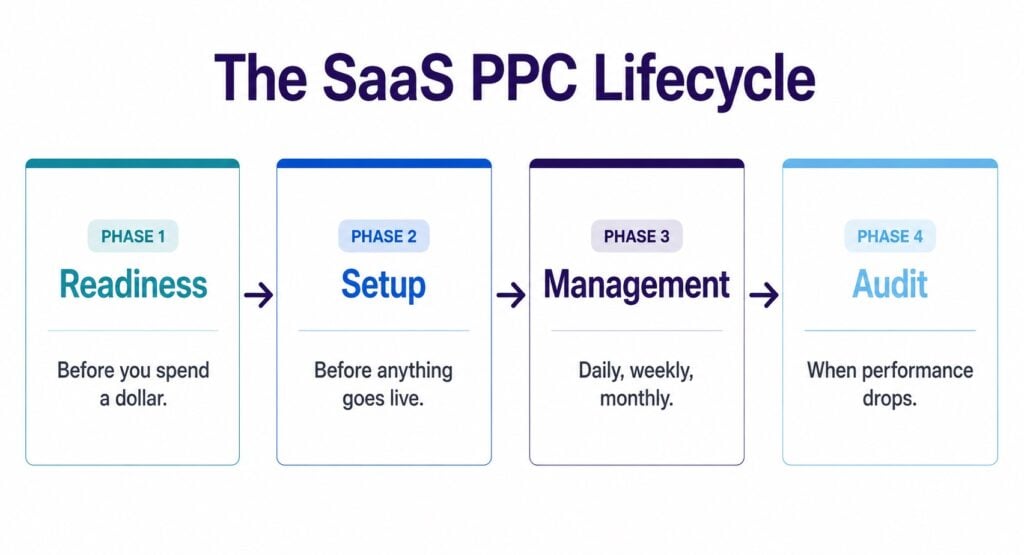
Phase 1: readiness checklist before you spend a dollar
Most PPC guides start at campaign setup. We start here. This is where most SaaS PPC failures begin. Not in the account, but just before it.
1. Run the unit economics calculation first
Before any campaign goes live, the math needs to work on paper. If it doesn’t work in a spreadsheet, it won’t work in Google Ads.
Here’s a realistic example. An AI email writing tool, $5 CPC:
| Input | Value |
| Monthly ad budget | $6,000 |
| CPC | $5 |
| Clicks | 1,200 |
| Visitor-to-trial rate | 8.4% |
| Trial starts | 101 |
| Trial-to-paid rate | 20% |
| Paid users | 20 |
| Cost per paid user | $300 |
| LTV | $800 |
| ROAS | 269% |
That works.
Now change one number. Drop LTV to $80 and keep everything else the same.
| Input | Value |
| Monthly ad budget | $6,000 |
| CPC | $5 |
| Clicks | 1,200 |
| Visitor-to-trial rate | 8.4% |
| Trial starts | 101 |
| Trial-to-paid rate | 20% |
| Paid users | 20 |
| Cost per paid user | $300 |
| LTV | $80 |
| ROAS | 27% |
You’re paying $300 to acquire a user worth $80. The math breaks before a single campaign is built. That’s the point of running it first.
The targets to hit: CPA at or below 50% of LTV. Payback under 10 months.
If you don’t have a CPC estimate yet, Google Keyword Planner gives a range for most terms before you spend anything. Our Google Ads for SaaS guide covers how to use it.
2. Check that your problem is being searched for
A strong product in a market nobody searches for is a paid social problem, not a paid search problem.
Use Google Keyword Planner to check monthly search volume for your core terms before committing budget. A few dozen searches a month is not a scaling opportunity in paid search. For LinkedIn or Meta, check audience size for your ICP first. If the audience is too narrow, frequency goes up, CPMs go up, and the unit economics get worse before you’ve spent a dollar.
3. Confirm product-market fit
Paid ads amplify what’s already working. They don’t create it.
If organic signups aren’t converting to paid, ads will bring more of the same traffic at a worse CPA. We turn away companies without PMF. Not because we don’t want the work. Because they won’t win.
4. Know your LTV by plan and user type
Not a rough estimate. A real number from real cohorts.
For PLG SaaS, LTV varies by product angle, user type, and plan. One design tool we worked with had users across two product types. One group had an LTV of $250. The other had an LTV of $40. Same product. Same ads. Very different outcomes. Once we stopped running campaigns for the low-LTV product, CPA dropped and paid user quality went up. If you don’t know your LTV by segment, you can’t set a CPA target that makes sense.
5. Have at least one inbound channel working
PPC alone is not a foundation. If you have zero organic traction, no word-of-mouth, and no SEO traffic, your conversion funnel has no baseline.
When organic traffic is converting, you know your pages work. Paid ads then focus that further. Instead of a broad mix of search terms, you’re buying the high-intent ones specifically. The same funnel, but with better traffic going into it.
When there’s no baseline at all, you’re running paid spend into an unproven funnel. That’s a research project, not a growth channel.
6. Have a meaningful budget
$1,000 per month won’t gather enough data to learn from. For most PLG SaaS, $5,000 per month in ad spend is the floor. Less than that and you’re getting 2-3 clicks a day and hoping.
7. Confirm your landing page converts cold traffic
Not your homepage. A dedicated page matched to the keyword and the ICP. Outcome-led headline, clear signal of who it’s for, specific proof, one CTA.
If the page doesn’t convert warm traffic well, it won’t convert cold traffic from ads. Fix the page before you pay for the clicks.
Run through this before you book a single campaign:
| Gate | Ready? |
| Unit economics work on paper (CPA under 50% of LTV) | Yes / No |
| Core keywords have meaningful search volume | Yes / No |
| Product-market fit confirmed | Yes / No |
| LTV known by plan and user type | Yes / No |
| At least one inbound channel converting | Yes / No |
| $5,000+/month in ad spend available | Yes / No |
| Dedicated landing page ready for cold traffic | Yes / No |
| Tracking in place for trial, credit card add, and purchase | Yes / No |
If most of these are No, PPC is not the right next move. Fix the foundation first, then come back.
Phase 2: the campaign setup checklist
Once readiness is confirmed, here’s what needs to be in place before anything goes live.
Conversion actions defined and verified
- Primary: credit card added or plan purchased.
- Secondary: trial signup.
Verified in Google Ads, not just installed.
The conversion event hierarchy: plan purchased first, then credit card added, then trial started. All three tracked separately. The algorithm should be moving toward revenue, not the easiest event to fire.
If volume is low early on, optimize for the event closest to purchase that still gives you enough data. Once you’re getting 15-30 conversions a month, shift the primary event toward revenue. Optimizing for signups early might be necessary. Staying there is the mistake.
Product usage quality signals: beyond trial start, track events that show the user is actually in the product:
- Added employees or team members
- Created a project or work item
- Connected an integration
- Completed all onboarding steps
- Clicked upgrade or hit a paywall
When you have enough of these events per month, use them as primary signals. This is how you stop paying for signups from users who never activate. The algorithm learns what a good user looks like, not just who signed up.
Source of truth: product database first, then Google Ads. Never GA4 pageview goals as a primary optimization event. Use offline conversion uploads from your product database where possible to bring real revenue signals back into the platform. This is core to getting your Google Ads conversion tracking right for PLG SaaS.
Auto-tagging: confirm it’s on in account settings. This adds a GCLID to every click and makes every conversion trackable back to its source.
Keyword research and intent mapping
For PLG SaaS, keywords are split into four intent tiers. Start at the top and work down as performance data builds.
| Intent tier | Examples | When to activate | Match type |
| High intent, solution aware | “time tracking software,” “AI email writer” | First. Always. | Exact + phrase |
| High intent, industry specific | “time tracking for construction,” “CRM for real estate” | Early. High conversion potential. | Exact + phrase |
| Competitor alternative | “[Competitor] alternative,” “[Competitor] vs” | After core terms are profitable. | Exact + phrase |
| Medium intent, problem aware | “timesheet templates,” “infographic templates” | Later. Cheaper CPCs, lower intent. | Phrase with strong negatives |
Never start with broad category terms like “project management software” against enterprise players with 10x your budget. Never bid on a competitor’s brand name alone. Those users are existing customers or employees, not buyers.
Campaign and ad group structure
One topic. One landing page. One ad group. Up to 15 keywords per ad group.
The relevance test: search query, ad copy, and landing page must all match. A user searching for an AI email writer who sees an AI meeting assistant ad and lands on a different product page produces 0% conversion, regardless of budget.
Exact and phrase match only in early accounts. Broad match only after strong conversion data and an extensive negative keyword list are in place. Even then, treat it carefully.
Ad copy built around the ICP
Speak to the specific pain point. Not features. The headline should match the search query. The description should speak to the outcome. The CTA should name what happens after the click.
Write differently for each ad group. An infographic maker ad and a presentation maker ad have different buyers, even inside the same product.
Customer and lead lists uploaded at launch
Before the first campaign goes live, upload these lists to Google Ads under Tools > Shared Library > Audience Manager > Customer Lists:
- Paying customers (positive signal for similar audience targeting)
- All customers and current users (exclusion for new user campaigns)
- High-quality trials
- Disengaged users
This gives the algorithm a head start. It already knows what a paying customer looks like before the first click. Bigger lists mean faster learning and fewer wasted impressions on people already in your product.
Negative keywords from day one
Student terms, free-tool modifiers, irrelevant industry terms, competitor brand names unless intentional. For desktop-first PLG products, mobile traffic often needs excluding from the start.
TextByChoice hit 140% ROAS in month one. Removing mobile traffic was part of how.
Bid strategy: Max Conversions first
Not tCPA. Not Target ROAS. Start with Max Conversions. Move to tCPA only after 15-30 conversions in the last 30 days. The algorithm needs data before it can hit a target.
Branded and non-branded in separate campaigns
Do this before anything goes live. They measure different things. Mixing them inflates ROAS and hides the real cost of acquiring a new customer. Report separately. Make decisions separately.
Phase 3: the ongoing PPC management checklist
Running campaigns is not the same as managing them. This is the PPC management checklist we use across every PLG SaaS account.
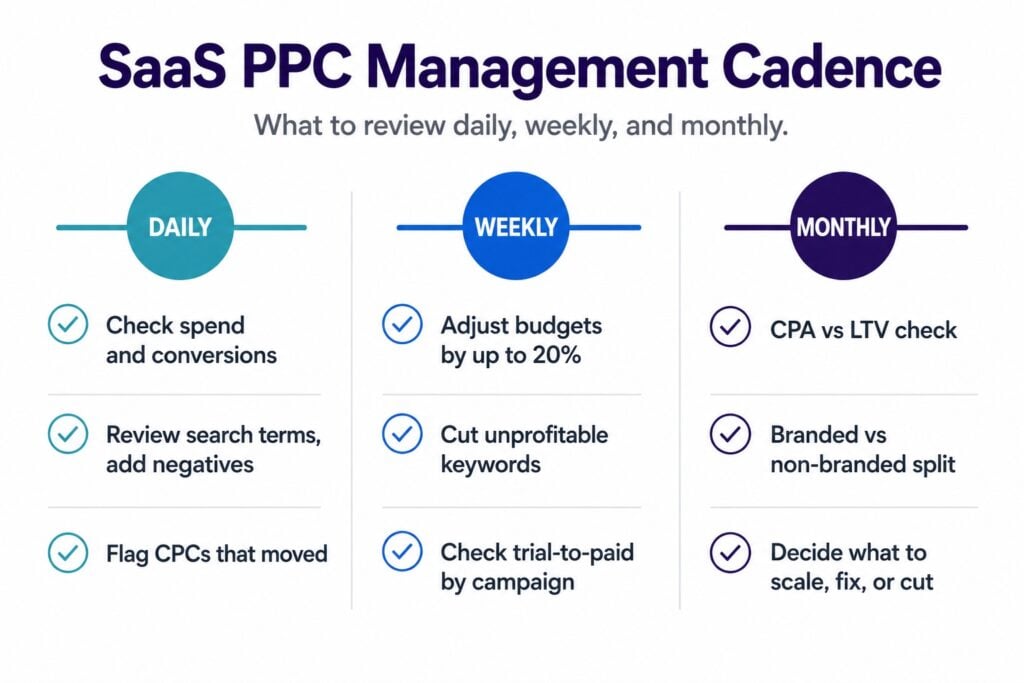
Daily
Start with the campaigns that spent the most. That’s where the biggest impact is.
- Spend pacing and conversion volume. Anything off?
- Search partners: eating budget and bringing irrelevant traffic? Remove.
- Device split: is mobile taking a large share in a desktop-first product? Exclude it.
- Campaign level: high CPAs or low conversion rates? Go to ad group level.
- Ad group level: which takes the most spend? Any with high CPA, low CVR, or low CTR?
- Keyword level: which spend the most? Are priority keywords getting budget? Any with high CPA or low CTR?
- Search terms: new irrelevant queries? Add as negatives.
- Ad level: any with significantly lower CTR than others? Review the copy.
- Headlines and descriptions: any with very low impressions? Google is telling you something.
- Flag any CPCs that have moved significantly.
Weekly
Everything in daily, plus:
- Campaigns with the best and worst CPA. Adjust budgets in 20% increments maximum.
- Conversion rate by campaign. Any outliers?
- Keywords taking the most spend. Are they the right ones?
- Unprofitable keywords. Cut or reduce.
- Keywords generating bad search terms over time. Restructure or remove.
- Trial-to-paid rate by campaign, not just trial volume.
- Device split performance.
- Ad copy: which headlines are getting impressions vs clicks.
Monthly
Higher-level review. Step back from the daily and weekly noise and look at the bigger picture:
- CPA vs LTV. Is payback still on track?
- Landing page conversion rate vs last month.
- Keyword expansion or cuts based on 30-day data.
- Branded vs non-branded ROAS split. Are numbers being padded by brand terms?
- Underperforming campaigns: fix or cut budget?
- Performing campaigns: ready to scale?
- CPA trend month over month. Seasonality or a real performance drop?
Flag immediately
- CPCs running high for 14+ days with no conversion signal. Act: CRO, keyword cuts, or offer change.
- Conversion tracking discrepancy between Google Ads and product DB. Don’t optimize on bad data.
- Mobile traffic eating budget in a desktop-first product.
Hopper HQ is a good example of what this looks like in practice. 647 credit card trials in 3 months, 233% ROAS. The launch setup was solid, but those numbers came from what happened after, not before.

Phase 4: the PPC audit checklist when performance drops
Run this PPC audit checklist when CPA is rising, conversion volume is dropping, or results have plateaued. Before making any structural change, check these first.
Conversion tracking audit
- Are all three conversion events still firing and matching the product database?
- Is auto-tagging still on?
- Any discrepancy between Google Ads conversion count and backend revenue data?
Keyword and traffic audit
- Search terms report: what queries triggered impressions in the last 30 days? Add negatives for anything irrelevant.
- Are irrelevant queries showing up from broad match or Performance Max? Exclude them.
- Is mobile traffic taking a disproportionate share in a desktop-first product?
Campaign structure audit
- Are keywords grouped by topic with matched landing pages?
- Does search query, ad copy, and landing page match across every ad group?
- Are branded and non-branded campaigns still separated?
The scale, fix, or stop decision
Once you’ve run through the audit, every account falls into one of three states. Here’s how to decide what to do next.
| Signal | Action |
| CPA under 50% of LTV, trial-to-paid holding, volume real | Scale. Increase budget in 20% weekly increments. |
| CPA rising, CVR declining, search terms drifting | Fix. Find the structural issue before adding budget. |
| CPA structurally above LTV, volume too thin, tracking broken | Stop or pause. Address the blocking condition first. |
Signs you’re not ready for PPC yet
This is the section most agencies won’t write.
- No PMF yet. Ads will bring traffic. It won’t convert.
- LTV under $100 with CPCs above $5. The math breaks before you start.
- No tracking on in-product events. You’ll be flying blind.
- Less than $5,000 per month in ad spend. Not enough data to learn.
- You want results in 30 days. Month 1 is learning. Month 2 is tuning. Month 3 is when you see signal.
If most of these apply, PPC is not the right next move. Fix the foundation first, then come back.
When you’ve checked the boxes, here’s what comes next
If you worked through this PPC checklist and most answers are yes, paid ads can work for your product. The next question is which keywords to start with, what CPA target makes sense for your LTV, and whether your landing page will convert cold traffic.
Camel Digital offers a free audit for PLG SaaS teams who are ready to find out. You share your screen, we share what we see. No pitch, no follow-up pressure. You walk away knowing exactly where you stand.
FAQs
What is a PPC management checklist?
A PPC management checklist is a structured list of tasks and conditions to check at each stage of running paid ads. It covers pre-launch readiness, campaign setup, ongoing management, and auditing when performance drops. For SaaS, it should also include unit economics and conversion event hierarchy.
How do I know if my SaaS product is ready for paid ads?
Calculate your estimated CPA using your CPC, visitor-to-trial rate, and trial-to-paid rate, then compare it to your LTV. CPA should land at or below 50% of LTV. You also need product-market fit confirmed, tracking in place for core events, and at least one inbound channel already converting.
What budget do I need to start PPC for SaaS?
For most PLG SaaS products, $5,000 per month in ad spend is the floor. Below that, there isn’t enough data for the algorithm to learn from.
What should I track before launching a PPC campaign?
Three events at minimum: trial started, credit card added, and plan purchased. All three tracked separately and verified in Google Ads before launch. Product usage signals like team member added or integration connected are also worth setting up early.
What’s the difference between a primary and secondary conversion in Google Ads?
Primary conversions are used by Smart Bidding to train the algorithm. Secondary conversions are tracked for reporting only and don’t affect bidding. For PLG SaaS, credit card added or plan purchased should be primary. Trial signup should be secondary.
Why is defining an ICP important for SaaS PPC?
Because the same product can have buyers with very different LTVs. Without a clear ICP, you can’t choose the right keywords, write the right ads, or tell Google what a good conversion looks like.
How important is competitor analysis before launching SaaS PPC campaigns?
It’s important for keyword strategy. Knowing which terms competitors are bidding on tells you where CPCs are high before you enter those auctions. For PLG SaaS, adjacent terms can have lower competition than broad category terms. But lower CPC doesn’t mean better results. The question is always whether the intent is strong enough to convert at a CPA your LTV can support.
How often should I run a PPC account audit?
Run a full audit any time CPA is rising, conversion volume is dropping, or results have plateaued. The daily, weekly, and monthly management cadence should catch most issues before a full audit is needed.